
LLM Wiki
Turn PDFs, articles, transcripts, and notes into a shared wiki that your AI agents can search, cite, and keep up to date.
AI agents are good at the task in front of them, but a new session starts with limited context. LLM Wiki gives them a shared memory that can live in one personal wiki across all projects or inside a specific project.
Add a source once. The agent turns it into linked Markdown pages. Later, it can find the right section, answer with citations, and save useful learning back into the wiki.
Everything canonical stays in readable Markdown. Local semantic search uses a disposable SQLite vector index—never a hosted vector database or embedding service.
Why this exists
AI agents can do good work in one session. The problem is what happens after the chat ends.
A useful answer may be buried in last week's conversation. A decision may live in a meeting transcript. A correction may sit in an issue. When that context is scattered, the next agent has to find the same files and rebuild the same understanding.
LLM Wiki gives that work somewhere durable to go. Sources become linked Markdown, answers keep their citations, and useful conclusions can be saved for the next session or the next agent.
Use it when knowledge should outlive one conversation: long-running research, customer calls, project decisions, recurring questions, and work shared across agents. For one-off questions or structured records, a chat or regular database may be the better tool.
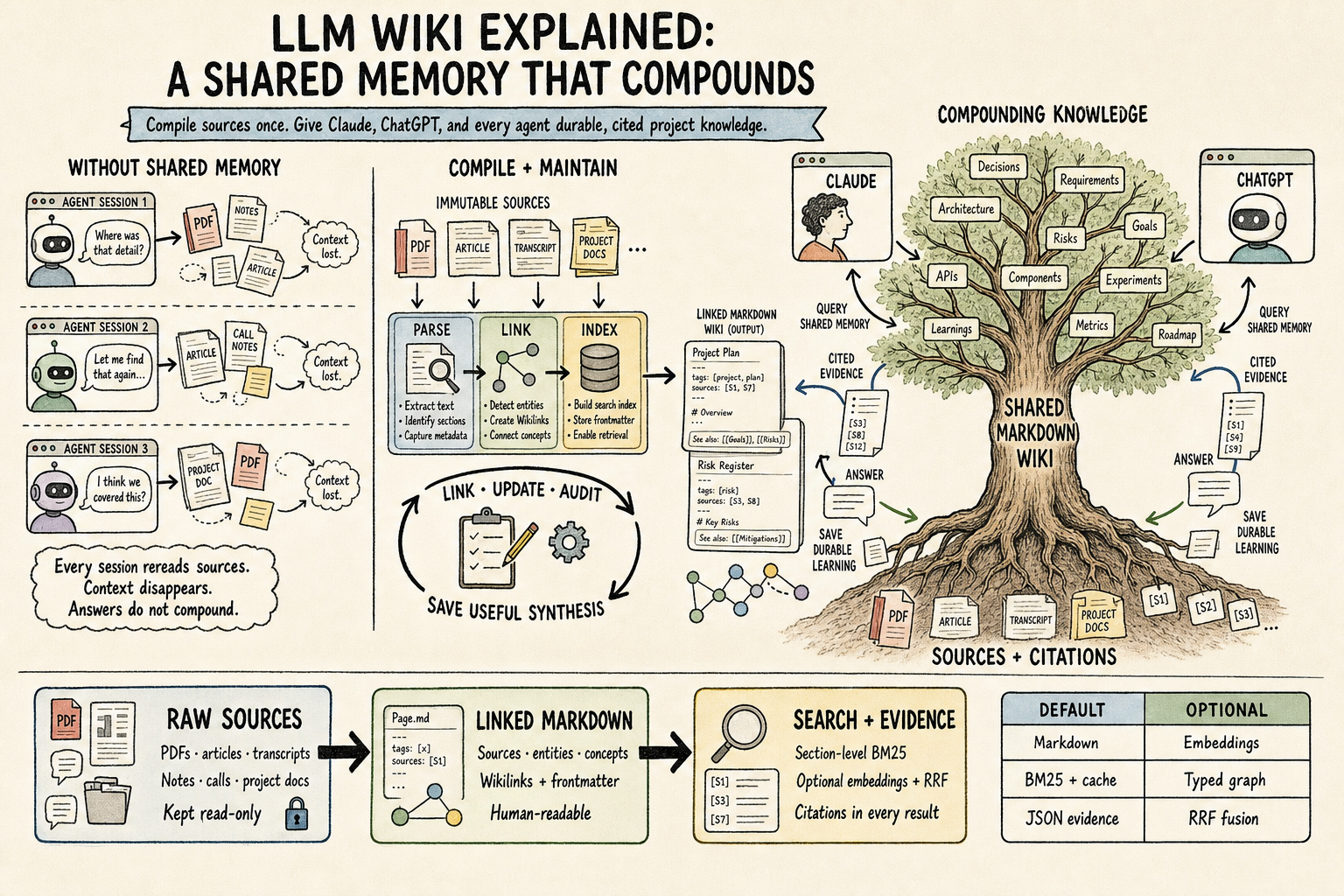
Add sources once, retrieve cited evidence later, and save useful learning back so the next session starts with more than the last one did.
New in v3.2.0
Capture verified task experience, consolidate reusable lessons and evaluate evidence-linked skill changes with explicit apply/rollback. Existing local search and wiki pages remain compatible. See Learning and skill evolution and Upgrade.
How it works
Add each source once. Later questions use the shared wiki instead of starting from the raw files again.
Three steps to a working wiki
Initialize one personal wiki shared across projects.
bash/wiki:init --globalUse
/wiki:initwithout--globalwhen the wiki should belong only to the current project.Ingest your first source — a PDF, an article, a transcript.
bash/wiki:ingest ~/wiki/raw/your-source.pdfQuery the accumulated knowledge, with citations.
bash/wiki:query What does my wiki say about X?
Not a Claude Code user? The same skill runs in Codex, Cursor, Pi, OMP, and more — see Getting started and the agent support matrix.
Explore the docs
- Getting started — Install for your agent, then walk through init, ingest, query, and lint.
- Commands — Every
/wiki:*slash command with usage and examples. - Workflows — Step-by-step ingest, query, and lint walkthroughs for end users.
- Search & retrieval — Local hybrid retrieval, section-level BM25, JSON evidence, and incremental caches.
- Graph layer — The optional compiled graph for typed, provenance-backed relationships.
- Integrations — The Paperclip plugin that surfaces the wiki inside a team UI.
- Agents — Which coding agents are supported and how to install for each.
- Upgrade to v3 — Move provider-backed setups to local vectors with no content migration.
Frequently asked questions
What is an LLM Wiki?
LLM Wiki is a shared knowledge base for AI agents. It turns your sources into linked Markdown pages, keeps them organized, and answers later questions with citations.
How is LLM Wiki different from RAG?
RAG usually searches raw document chunks each time you ask a question. LLM Wiki organizes each source into useful pages first. Later questions search that growing body of knowledge, including its links, corrections, and source history.
Does LLM Wiki require a hosted embedding service or vector database?
No. Default semantic search runs locally with FastEmbed and sqlite-vec, and Markdown remains canonical. If you want no model or optional packages at all, run the search script directly with Python and --no-embed for pure-Python BM25.
Which coding agents support LLM Wiki?
The agentskills.io-compatible skill supports Claude Code, Codex, Cursor, Gemini CLI, OpenCode, OpenClaw, Pi, OMP, and Hermes. Claude Code also receives /wiki:* slash commands through the plugin; other agents invoke the same workflows through natural language. See the agent support matrix.
How do I install and start using LLM Wiki?
Install the plugin or skill for your agent, run /wiki:init, ingest a source with /wiki:ingest, then ask a cited question with /wiki:query. Run /wiki:lint periodically to catch structural and semantic issues. The getting-started guide lists exact commands for every supported agent.
LLM Wiki plugin, MIT licensed. Source on GitHub. Based on Karpathy's LLM Wiki gist, with section retrieval informed by Cerebras's How We Built Our Knowledge Base and the local FastEmbed + sqlite-vec architecture validated against Basic Memory.
Learning from task experience
The optional evolution workflow adapts WikiSkill into persistent experience capture, pattern consolidation and tested skill changes. See the adaptation map and measured limits. The current study demonstrated no quality gain.